//利用檔案下載頁,並將檔案放在虛擬目錄外的地方。
string fileName = string.Empty;
if (Request.QueryString["fileName"]!= null && Request.QueryString["fileName"].Length > 0)
fileName =Server.UrlDecode(Request.QueryString["fileName"]);
////或用Post取值
//利用檔案下載頁,並將檔案放在虛擬目錄外的地方。
string fileName = string.Empty;
if (Request.QueryString["fileName"]!= null && Request.QueryString["fileName"].Length > 0)
fileName =Server.UrlDecode(Request.QueryString["fileName"]);
////或用Post取值
使用Sqlparameter的方式可以有效的避免Sql Injection的攻擊,所以在做資料Filter時,也儘量使用Sqlparameter
的功能。
一般使用Like查,當然少不了 % 這個指示符。
加上 % 有二種寫法
其一:
cmd.commandText="Select * From Emp Where EmpName like @EmpName ;";
cmd.parameters.add("@EmpName",sqldvtype.nvarchar,20).value= "%" + txtEmpName.Text.Trim() + "%"; //過濾前後空白
其二:
using Microsoft.Win32;
//加密
private string Encrypt(string Org,string key)
{
string res = "";
把FileUpload的檔案(圖檔)上傳至MS Sql中,然後從資料庫讀出後,利用ashx的泛型處理轉成二進位位元組,呈現在GridView中。
建置:
Create Table UploadImg(
id int identity(1,1),
images image null
)


一、新增使用者控制項。
二、處理程式:
三、如要從物件的SelectDates取出日期陣列,要在PagePrerender中取,因為這時候使用者控制項才會有完整的值。
<%@ Control Language="C#" ClassName="CalendarS" %>
今天為了解決掉IE7的網址列的問題,花了一段時間。
在IE7的架構下,如果網站本身沒有加入「信任的網城」的話,會強制出現網址列與狀態列。解決的方式只能請使用者將網站加入信任,不然很多東西都會破功的,所以這只能治標,不能治本。
設定前:

設定:
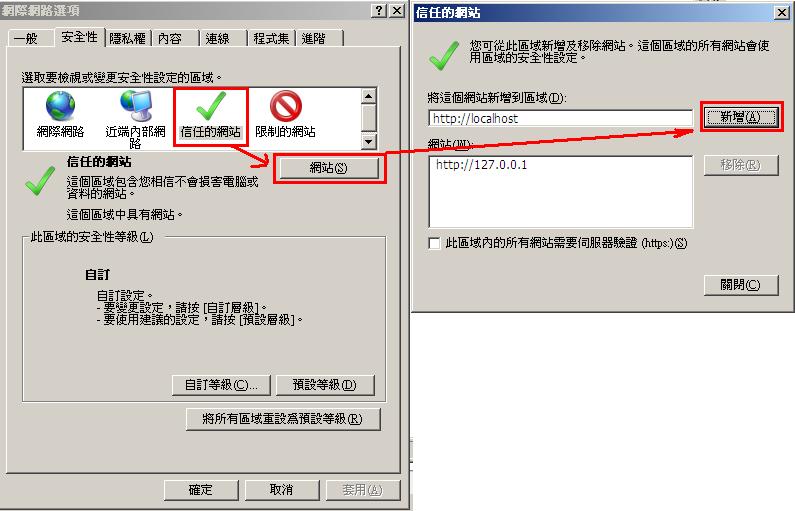
設定後:
原來
readonly有這麼神奇卻又除不出錯的功效。
TextBox 如果把 ReadOnly 屬性設定為 True,透過 JavaScript 設定的值,在 ASP.NET 2.0 是無法取到值的!
解決之道:


 電腦網路 (2)